Smart SEO Booster — Free, Complete WordPress SEO Plugin

Schema markup, XML sitemaps, meta tags, breadcrumbs, Core Web Vitals reporting and llms.txt for AI search — everything your WordPress site needs to rank, in one lightweight, genuinely free plugin with no upsells.

In short: Smart SEO Booster is a free, lightweight WordPress SEO plugin that automates JSON-LD schema, XML sitemaps, meta tags, breadcrumbs and social previews, adds redirects, WooCommerce and AI/GEO support, and lets you migrate from Yoast or Rank Math in one click.

Free · GPLv2 WordPress 5.9+ PHP 7.4+ Version 2.2.2 Tested up to 7.0

File created:  •  Last modified:

Everything You Need to Rank — in One Free Plugin

14 JSON-LD Schema Types

Automatic structured data for Article, Product, Recipe, Event, HowTo, FAQ, Local Business and more — so search engines and AI understand your content.

XML Sitemaps

Automatic sitemaps for posts, pages, custom post types and images to help Google discover and index every page.

Automated Titles & Meta

Dynamic SEO titles and meta descriptions with template variables, plus per-post control and focus keywords.

Open Graph & Twitter Cards

Rich social previews with a live preview editor, so links look great on Facebook, LinkedIn and X.

Breadcrumbs

SEO-friendly breadcrumbs via shortcode, template tag and schema for better navigation and rich results.

Redirects & 404 Manager

Create and manage redirects and catch broken links with built-in 404 logging — no extra plugin needed.

AI / GEO SEO

Get cited by AI answer engines: llms.txt output and AI-crawler opt-out controls built for the era of AI Overviews, ChatGPT and Perplexity.

1-Click Migration

Switch from Yoast SEO or Rank Math in one click — import your titles, meta and settings safely.

Analytics & Audit

Google Analytics 4 and Microsoft Clarity integration, real-time SEO scoring, and a site-wide audit dashboard.

Core Web Vitals Report

Check any page against Google PageSpeed Insights without leaving WordPress — Performance, SEO, Accessibility and Best Practices scores plus LCP, CLS and INP. No API key needed.

FAQ & How-To Blocks

Add an FAQ accordion or a step-by-step guide and get valid FAQPage and HowTo schema automatically — the markup Google reads for rich results.

Table of Contents

A block that builds a jump list from your post's own headings, adding heading anchors site-wide so the links work even on themes that never added them.

17 Languages

The admin interface ships translated into 17 languages, with RTL-safe styling throughout.

System Requirements

Requirement Minimum Recommended
WordPress 5.9+ Tested up to 7.0
PHP 7.4+ 8.x recommended
Price Free GPLv2 or later — no upsells
Tags seo, schema xml sitemap, meta tags, breadcrumbs

Installation

Automatic Installation

  1. Log into your WordPress admin area.
  2. Go to Plugins -> Add New.
  3. Search for "Smart SEO Booster".
  4. Click "Install Now" and then "Activate".
  5. Navigate to "SEO Settings" in your admin menu.

Best for most users.

Manual Installation

  1. Download the plugin ZIP file.
  2. Log into your WordPress admin area.
  3. Go to Plugins -> Add New -> Upload Plugin.
  4. Choose the ZIP file and click "Install Now".
  5. Activate the plugin.
  6. Navigate to "SEO Settings" in your admin menu.
Download ZIP

Getting Started

  1. After activation, go to SEO Settings in your WordPress admin.
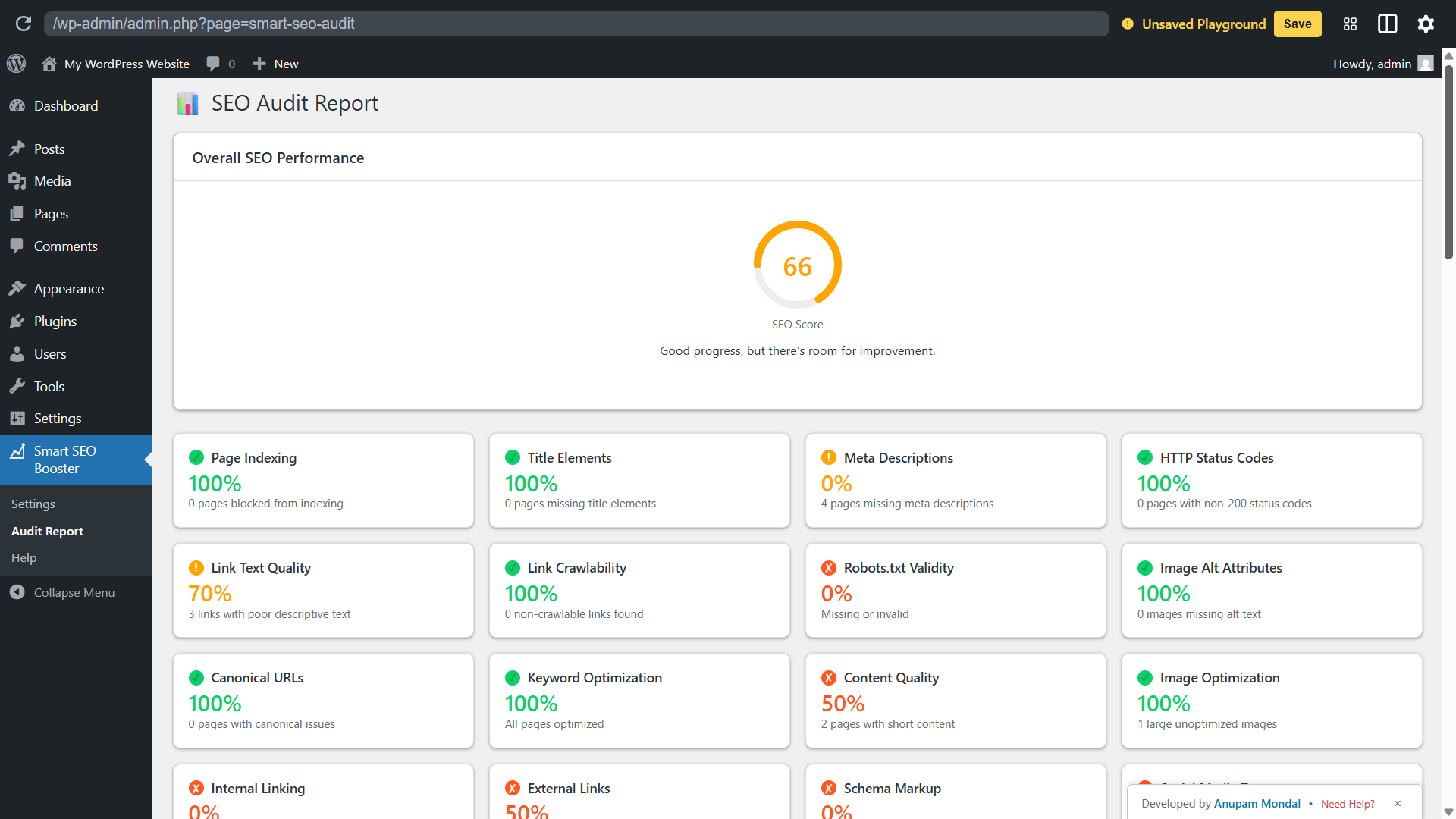
  2. Click on Audit Report to run your first SEO analysis.
  3. Review the comprehensive analysis and recommendations.
  4. Implement suggested improvements for better SEO performance.

Contributors and Developers

Translate Smart SEO Booster into your language and help improve global accessibility for the WordPress community.

Interested in development?

Content, Technical & Growth SEO — Covered

Content & On-Page SEO

  • Automated SEO titles & meta descriptions with template variables
  • Per-post SEO meta box with focus keyword & canonical
  • Real-time SEO scoring in the editor, admin bar & post lists
  • Open Graph & Twitter cards with live preview
  • Automatic image alt text generation
  • Bulk SEO editor for titles & metas at scale
  • Gutenberg blocks, patterns & native editor sidebar

Technical & Growth SEO

  • 14 JSON-LD schema types, output automatically
  • XML sitemaps for posts, pages, CPTs & images
  • Breadcrumbs via shortcode, template tag & schema
  • Redirection manager with 404 logging
  • AI / GEO SEO: llms.txt & AI-crawler opt-out
  • WooCommerce & Local SEO support
  • GA4 & Microsoft Clarity integration + site-wide audit

Plugin Screenshots

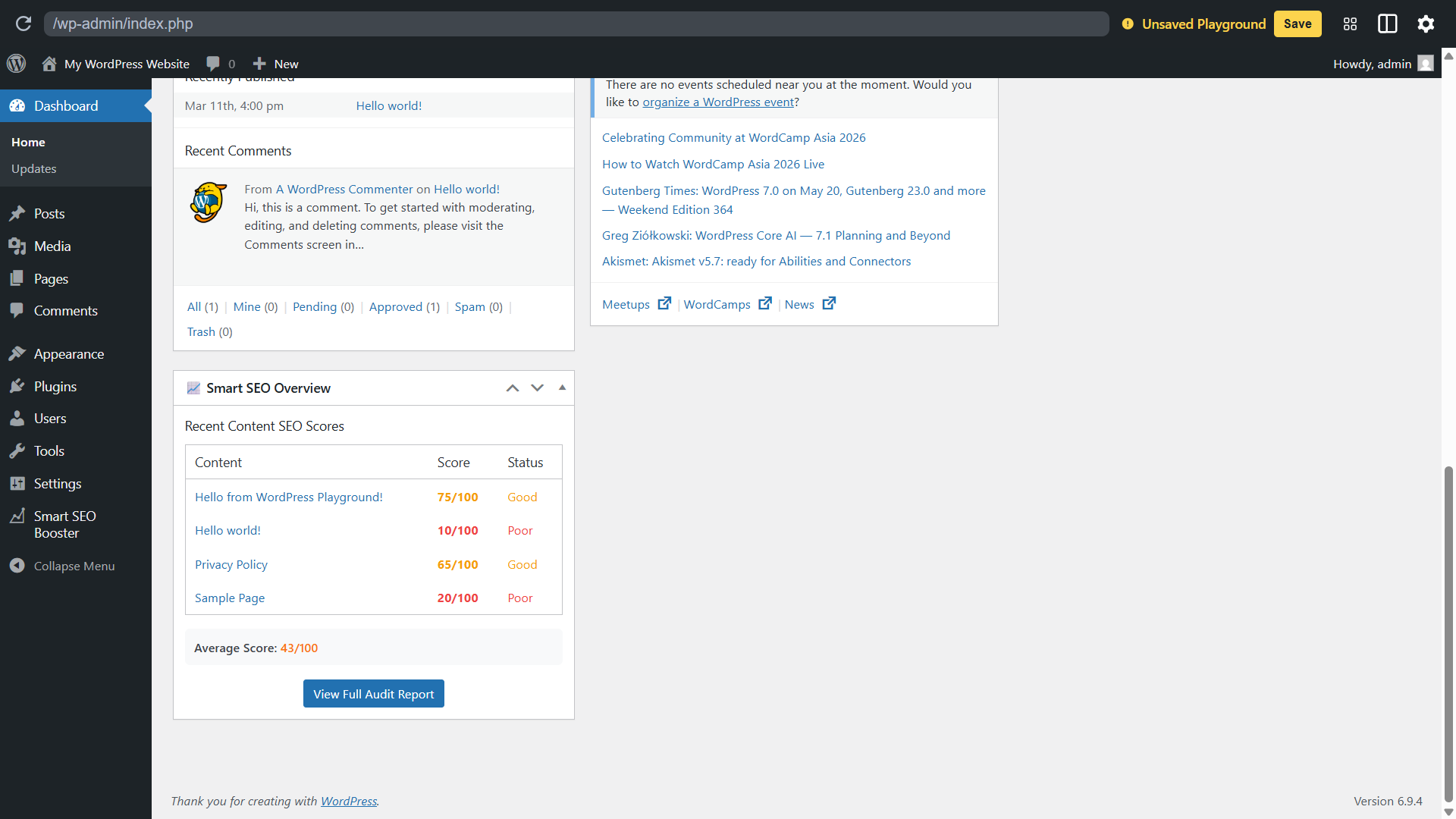
Smart SEO Booster WordPress plugin admin dashboard showing SEO score and settings

Admin Dashboard

Smart SEO Booster site-wide SEO audit report with issues and recommendations

SEO Audit Report

See more screenshots and documentation on GitHub

Frequently Asked Questions

Yes. Smart SEO Booster is 100% free and released under the GPLv2 licence, with no premium tier, paywalls, or upsells. Every feature — schema, XML sitemaps, meta tags, breadcrumbs, redirects and AI/GEO SEO — is included at no cost.

Yes. It offers the core SEO features most sites need — schema, sitemaps, meta automation, breadcrumbs and social cards — in a lightweight, no-upsell package, and includes one-click migration so you can import your settings from Yoast SEO or Rank Math.

Smart SEO Booster outputs 14 JSON-LD schema types including Article, BlogPosting, Product, Recipe, Event, HowTo, FAQ, Local Business and more — automatically, and in the page footer for minimal performance impact.

Yes. It includes AI/GEO SEO features such as an llms.txt file and AI-crawler opt-out controls, helping your content be understood and cited correctly by AI answer engines like Google AI Overviews, ChatGPT and Perplexity.

No. Smart SEO Booster is built to be lightweight — it uses minimal hooks and outputs schema only where needed, so it adds SEO capability without the bloat of heavier plugins.

Enable Serve an llms.txt file under Smart SEO → Settings → AI & GEO. The file is generated from your published content and served at /llms.txt, so it stays current as you publish instead of going stale like a hand-written one. If it does not load, visit Settings → Permalinks and click Save once to flush your rewrite rules.

Turn on Ask AI crawlers not to train on this site under Smart SEO → Settings → AI & GEO. This adds robots.txt rules for GPTBot, Google-Extended, ClaudeBot, CCBot and others. Two things worth knowing: Google-Extended controls Gemini training only and has no effect on your Google Search rankings, and blocking training crawlers can also reduce how often AI assistants cite your site — so it is worth deciding deliberately.

Yes. Smart SEO → Page Speed runs a Google PageSpeed Insights check on any URL of your site and reports Performance, SEO, Accessibility and Best Practices scores alongside Core Web Vitals (LCP, CLS and INP), rated against Google's thresholds. It uses real-user CrUX field data where Google has it and lab data otherwise. No API key is required, though you can add a free one for higher-volume checks.

Add the FAQ (Smart SEO) block in the block editor and fill in your questions and answers. It renders an accessible accordion on the front end and outputs FAQPage JSON-LD automatically, which is what Google reads for FAQ rich results. A matching How-To block outputs HowTo schema the same way.

Yes. It integrates with WooCommerce, supports posts, pages and custom post types, and provides native Gutenberg blocks and an editor sidebar with live previews, alongside classic-theme compatibility.

Yes. Smart SEO Booster includes a one-click importer to bring your titles, meta descriptions and settings across from Yoast SEO and Rank Math, so switching is quick and safe.

Support is available through the WordPress.org support forums. For bug reports and feature requests you can also use the GitHub repository, or contact the developer directly.

Changelog

2.2.2 (2026-08-11) — current stable

  • Fixed an oversized admin-menu icon introduced in 2.2.1

2.2.1 (2026-08-11)

  • One-click PageSpeed Insights and Google Rich Results Test links on the posts/pages list and in the SEO meta box
  • An occasional, dismissible reminder to leave a WordPress.org review — shown only after two weeks of real use, and switchable off permanently in one click
  • Consistent plugin logo across the admin menu, page headings and block editor

2.2.0 (2026-08-01)

  • Page Speed report — Google PageSpeed Insights scores plus Core Web Vitals (LCP, CLS, INP), with no API key required
  • FAQ block with automatic FAQPage schema for rich results
  • How-To block with automatic HowTo schema
  • Table of Contents block built from your post's own headings
  • Readability now uses the Flesch Reading Ease score instead of a simpler heuristic
  • Recognisable brand icons beside every social, analytics and webmaster-verification field

2.1.1 (2026-07-24)

  • Fixed a fatal error on activation caused by an incomplete 2.1.0 package
  • Added a WordPress Playground preview blueprint for instant live demos
  • Refreshed listing icon, banner, screenshots and captions

2.1.0 (2026-07-19)

  • Complete free SEO toolkit release
  • 14 JSON-LD schema types with automatic output
  • XML sitemaps for posts, pages, custom post types and images
  • Automated titles & meta descriptions with template variables
  • Open Graph & Twitter cards with live preview
  • Breadcrumbs, per-post meta box, focus keyword & canonical
  • Real-time SEO scoring and site-wide audit dashboard
  • Redirection manager with 404 logging and bulk SEO editor
  • WooCommerce & Local SEO, GA4 & Microsoft Clarity integration
  • AI / GEO SEO: llms.txt and AI-crawler opt-out
  • One-click migration from Yoast SEO & Rank Math
  • Gutenberg blocks, patterns, editor sidebar and setup wizard

2.0.0 (2025-01-01)

  • Major rewrite with a modular architecture and expanded schema engine

1.1.0 / 1.0.0 (2024)

  • Early releases: SEO audit, content analysis and WordPress.org compliance
Release Snapshot
Version: 2.2.2 Last updated: Aug 11, 2026 Price: Free (GPLv2) WordPress: 5.9 or higher Tested up to: 7.0 PHP: 7.4 or higher
Coming next — on the roadmap

Shipped in the 2.2.x series: the Page Speed report, FAQ / How-To / Table of Contents blocks, Flesch readability scoring, the AI & GEO settings panel, social-account schema and 17 languages. Next up:

Google Search Console insights in the dashboard Import from SEOPress & All in One SEO Internal-link & orphaned-content suggestions Video & News sitemaps Multiple Local Business locations

Follow progress on the v2.2 development branch.

Ready to Boost Your WordPress SEO?

Download Smart SEO Booster and start optimizing your content today. Need help? Contact us for support.

Download Plugin Get Support

Explore More SEO Resources